

The best ad spot isn’t always at the top of a page. Online advertising placements are paid spaces offered by websites, publishers, and social networks. Each placement pairs an ad with a position, format, and audience. Choose one by matching those factors to your campaign goal.
It’s easy to focus on the creative, but where an ad appears shapes how people encounter it. This guide explains what ad placement means and how to choose options that fit your campaign, whether you’re reaching people on a website, in a mobile app, or through social media.
Explore common display, video, search, native, and social formats; compare page positions; and learn how mobile layout, loading speed, audience habits, and platform guidelines affect placement decisions. You’ll also find practical ways to test results and refine your choices over time.
Key Takeaways
- Match each placement to a clear campaign goal and the audience you want to reach.
- Compare ad positions using engagement and conversion data, rather than assuming the most visible spot performs best.
- Choose formats that fit the platform, and make sure creative works smoothly on mobile and desktop.
- Use relevant placements that support the page experience, and review platform guidelines before launching.
- Test different publisher, website, and social network spaces to learn which options best support your campaign.
1. How can I optimize ad placemenets for mobile?
Start by treating mobile and desktop as separate placement environments. Mobile traffic accounts for over 50% of internet usage, so a campaign designed only for desktop can miss a large share of visitors. Check each platform on both screen sizes, then adjust the ad position, dimensions, and creative to fit the available space. A sidebar placement on desktop, for example, may need a different mobile position.
Loading speed matters on every device. Slow-loading website ads can interrupt browsing and prompt visitors to leave before the content appears. Keep creative files efficient, avoid unnecessarily complex elements, and test on both a mobile connection and desktop. Check how quickly the ad appears, whether it shifts nearby content, and whether buttons are easy to tap. The aim is to deliver the message without delaying the page.
Use frequency capping to control how often the same person sees an ad. Repeated exposure can feel intrusive, while too few impressions may limit opportunities to recognize the message. Set a cap in the buying platform, then review reach and response together. If impressions rise but clicks and conversions do not, reduce repeated exposure or test a new audience and creative. Apply the cap consistently across placements where platform controls allow.
Use A/B testing to compare one placement decision at a time. Keep the audience, message, and campaign objective consistent while testing one mobile position against another. For example, compare a responsive in-content ad with a mobile-adjusted sidebar placement. Track impressions, click-through rate, and conversions for each version. Changing several elements at once makes it hard to tell which adjustment affected performance.
Make optimization part of your reporting routine, not a one-time setup. Review mobile and desktop results separately: a placement that earns clicks on a large screen may underperform on a phone. Compare impressions, clicks, conversion rate, and page behavior. Heatmaps can show where visitors scroll and engage, helping you spot placements that appear too early, too late, or outside the main reading path. Use those observations to plan the next test.
Review results weekly or monthly, and record each change and its outcome. If a Google campaign generates impressions but few conversions, examine the landing page and mobile experience before increasing exposure. Check that the ad’s promise matches the destination, the page loads quickly, and the next action is clear. This process links placement buying to campaign goals and makes future optimization more informed.
2. Comparing the performance of ad positions and formats
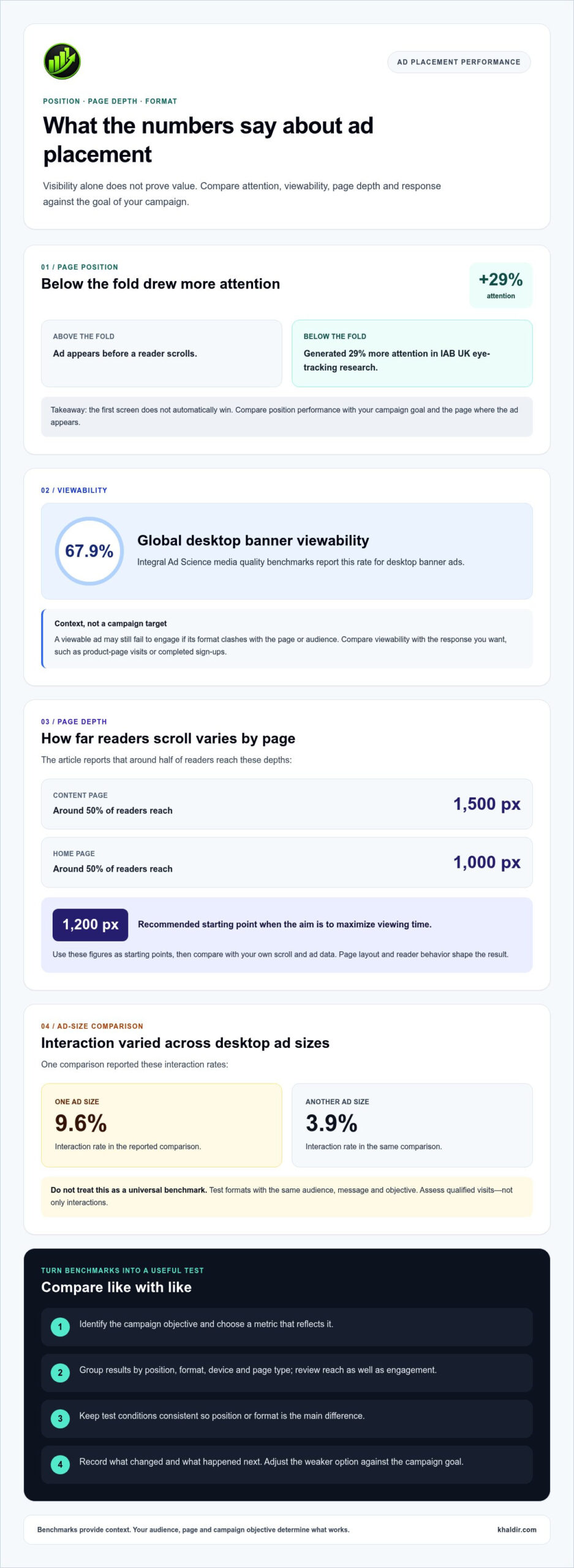
Position affects whether readers notice an ad, but visibility alone doesn’t prove value. Above-the-fold ads appear before scrolling, while below-the-fold ads require readers to move down the page. IAB UK eye-tracking research found below-the-fold placements generated 29% more attention than above-the-fold placements. This finding challenges the assumption that the first screen always wins. Compare each position against your campaign goal and the page where it appears.
Viewability and attention measure different parts of performance. Integral Ad Science media quality benchmarks report a 67.9% global viewability rate for desktop banner ads. That figure offers context, not a target for every campaign. A viewable display ad may still fail to attract engagement if its format clashes with the page or audience. Compare viewability with the response you want, such as product-page visits or completed sign-ups.
Page depth can also change the potential reach of a placement. Around 50% of readers see 1,500 pixels down a content page, while around 50% reach 1,000 pixels on a home page. A placement near 1,200 pixels is recommended when the aim is to maximize viewing time. Use those figures as starting points, then compare them with your own scroll and ad data. Page layout and reader behavior shape the result.
Format comparisons need the same care. One desktop ad-size comparison reported a 9.6% interaction rate for one size, compared with 3.9% for another. Treat that as a result from one comparison, not a universal benchmark. Test formats with the same audience, message, and objective. For example, compare a banner with a native unit, then examine whether either format brings more qualified visits, rather than simply more interactions.
Review existing performance data before moving an ad. Group results by position, format, device, and page type. Look for patterns: a sidebar unit may perform well on articles but poorly on a home page, while an in-content format may better suit long-form reading. Compare reach as well as engagement. A small audience can generate strong interaction figures without meeting a broader awareness goal.
Use a simple decision process: identify the objective, choose a relevant metric, compare placements, then adjust the weaker option. Keep test conditions consistent so position or format is the main difference. Record what changed and what happened next. If a placement attracts attention but few useful actions, reconsider its context or creative. If it reaches the right readers and supports the campaign goal, keep it in the mix and continue assessing its contribution.
3. Display, video, search, social media, native, and mobile app placements
Ad costs vary by platform, format, audience, and buying method. Auction-based placements depend on competing bids and campaign settings, while direct publisher arrangements depend on the inventory and agreed terms. Compare expected reach and audience fit alongside cost before choosing where ads appear.
Display ads use visual units placed on websites or apps, often for brand visibility or retargeting. Common banner positions include the top, bottom, or sides of a webpage. A half-page display unit measures 300 by 600 pixels, which can suit desktop layouts but may need a different mobile treatment. Choose a responsive creative that adjusts to its display space without hiding the page’s main content.
Video placements work in feeds, within content, or before other video. On mobile, an interstitial can occupy the screen between app activities; the described format may run for 30 seconds and be unskippable. That interruption makes context important. Place an interstitial at a natural pause, rather than during a task that users are trying to complete.
Mobile apps may offer rewarded video, where a viewer chooses to watch an ad in exchange for an in-app benefit. This format can suit games that provide a clear reward, such as an extra attempt. For mobile banners, keep the message brief and the action easy to tap. Match the creative to the app experience so ads don’t obstruct controls or essential content.
Search ads appear alongside search results, often near the top of a results page. They can reach people actively looking for a solution, while Facebook and Instagram ads can appear in users’ feeds and support discovery. Native ads are designed to fit surrounding content, but should remain identifiable as advertising. Choose a format based on campaign intent, audience behavior, and where the ad will appear.
Mobile layouts may not preserve desktop positions. A sidebar ad beside an article on a wide screen can move below the main content on a phone. Publishers can consider a mobile-adjusted sidebar placement when footer ads are unlikely to reach readers. Check the actual page on a phone and confirm the ad stays visible without covering text or navigation.
For app campaigns, separate placements by purpose: use display for visual reach, video to explain a product, and rewarded ads when an optional incentive fits. Track conversions against the action each format is intended to encourage. A video view, app install, and purchase are different outcomes, so compare like with like. This clarifies platform choices and avoids judging every format by clicks alone.
Costs vary by platform, format, audience, and buying method. Auction placements depend on competing bids and campaign settings, while direct publisher placements depend on the inventory and agreed terms.
4. Are there ad placement guidelines to be aware of?
Start with the campaign goal, then define the audience and spending limit before placing ads. For brand awareness, prioritize relevant contexts and reach; for website traffic, focus on placements that encourage visits. To assess return on investment, compare campaign costs with outcomes your business values, such as qualified leads or sales.
Advertisers choose placements by matching audience habits to campaign goals, then allocating budget across suitable platforms and formats. A business seeking nearby customers, for example, can prioritize geographic targeting and relevant local content over broad reach.
Available targeting options include demographics, geographic location, interests, and contextual relevance. Retargeting can reach people who previously interacted with a website or app, while audience personas help organize choices using demographic and behavioral insights. Choose options that relate directly to the offer, rather than adding targeting that doesn’t support the campaign.
For brand awareness, review the content and context surrounding each digital ad. Contextual placement means showing an ad in a website or publication section related to its subject. A cooking product beside a recipe article has a clear connection; the same ad beside unrelated content may feel out of place. Review the destination page and surrounding material before approving a placement.
Brand safety also means controlling where ads appear. Use platform tools such as content exclusions and negative keywords where available, then review placement reports for mismatches. For example, a family-focused brand might exclude terms or content categories that conflict with its intended tone. Revisit those controls as the campaign expands across websites and apps.
Agencies and in-house teams can make these checks part of a repeatable workflow. Before launch, document the campaign objective, target audience, approved contexts, exclusions, and reporting measures. During delivery, use analytics to review traffic quality, conversions, and placement suitability. If a site generates visits that don’t match the offer, pause or adjust that placement and record why.
Page experience matters too. A recommendation is to use 3-4 ad units per page, while keeping ads from distracting readers or disrupting the layout. Content-focused sites should avoid full-page ads when they would interrupt reading. Review platform and website guidelines before launch, since restrictions may apply to ad content and formats.
Finally, connect placement decisions to the result you need. A brand-awareness campaign may value relevant exposure, while a traffic campaign should assess visits and their quality. Use analytics to compare outcomes with the original objective, then shift budget toward placements that suit the audience and support the campaign without weakening the page experience.
5. Advertising spaces offered by online publishers, websites, and social networks
Publishers, websites, and social networks sell or provide spaces where advertisers can reach specific audiences. The space determines where an ad appears, while its content and context influence who notices it. A recipe publisher, for example, may offer a position within an article, while Instagram offers feed placements. Compare the environment and audience, not just the available dimensions.
On websites, common options include above-the-fold banners, siderail ads, in-content units, and footer placements. A leaderboard measures 728 by 90 pixels, while a medium rectangle measures 300 by 250 pixels. These sizes can help match creative to inventory, but the page layout determines whether the ad fits naturally. A siderail beside an article may suit desktop browsing; the same space may shift or disappear on mobile.
Publishers can also offer larger formats. A billboard measures 970 by 250 pixels, a super leaderboard measures 970 by 90 pixels, and a wide skyscraper measures 160 by 600 pixels. Consider each format’s purpose before booking: a prominent billboard can support broad visibility, while an in-content placement can connect a message to related reading. Footer ads depend on readers scrolling to the page bottom.
Social networks offer feed placements, where creative competes with posts people chose to view. Facebook and Instagram both allow businesses to display ads in users’ feeds. Video ads can also appear in social feeds or publisher content. Match the format to audience behavior: a short video may explain a product, while a clear static image can communicate one offer quickly.
For mobile inventory, check how the placement behaves on an actual phone. A desktop sidebar may move below the article, giving it little visibility before readers leave. Publishers can adapt sidebar ads for mobile or choose an in-content position that follows the reading flow. A successful mobile placement keeps text readable, actions easy to tap, and navigation unobstructed.
To get value from each space, map it to a campaign goal before buying. For awareness, compare reach and visibility; for traffic, assess visits and their relevance. Then review publisher or platform reporting by placement, format, and device. If a footer unit receives few views, test another location. If a video ad attracts attention but not useful actions, revise its message or destination.
Direct publisher arrangements can provide access to premium spaces, including native or influencer campaign placements. Before placing ads, agree on the format, location, audience, timing, and reporting measures. That shared plan helps both sides assess whether delivery matched expectations. For practical ways to connect advertising choices with business growth, explore online growth strategies.
Khaldir: SEO Visit’s
Khaldir offers SEO Visit’s and practical SEO and digital marketing guides for readers planning to grow online visibility. After comparing ad formats and positions, use these resources to connect placement decisions with broader marketing and SEO goals. For example, a business weighing paid visibility against search-focused growth can use the guides to clarify priorities and plan next steps.
Turn to Khaldir for practical learning resources to support digital marketing decisions, business education, or technology choices. The guides can help you build understanding before refining a campaign or exploring online growth strategies. Visit Khaldir.com to explore the resources.
Turn Your Placement Plan Into a Clear Next Step
Choose one campaign decision to act on next, such as clarifying your audience or setting the outcome you want to measure. A focused starting point makes it easier to make online advertising placements a practical part of your marketing plan.
If you’re ready to discuss your advertising plans, contact Khaldir about ad placements. A clear goal and a few notes about your intended audience can help frame the conversation.
Take the next step at a pace that suits your business, and keep learning from each decision.
Frequently Asked Questions
What Does Ad Placement Mean in Digital Marketing?
Ad placement identifies the inventory opportunity where a digital campaign can show an advertisement. It is separate from writing the message or designing the creative. For example, a publisher may offer an article-page slot, while a social platform offers feed inventory. Thinking of placement as the delivery location helps teams assign responsibilities: creative staff prepare the ad, while campaign managers choose where it can appear.
What ad sizes should I use for desktop placements?
Use the dimensions required by the specific publisher or platform, then prepare creative that keeps its essential message legible in that space. Before finalizing artwork, check how the logo, headline, and call to action appear at the actual display size. If the design relies on fine print or a small button, simplify it rather than shrinking every element. This makes the creative easier to review and understand.
Are there ad placement guidelines to be aware of?
Yes. Treat each publisher’s and platform’s guidance as a pre-launch review, not a last-minute step. Keep a record of the creative version, destination page, and placement approval so the team can trace what ran if an issue arises. Check that the landing page supports the ad’s central claim and that the ad doesn’t obscure navigation or key page actions. This creates a clear review trail.
How Do You Get Digital Ad Space?
Prepare a short media brief before buying space. State the campaign objective, intended audience, creative format, destination page, and results you’ll report. Then request inventory details from the publisher or set up a campaign through your chosen platform. Before launch, confirm that tracking works and the destination page records the action you want, such as a form submission or product inquiry.
How can I optimize ad placemenets for mobile?
Test the full path from the mobile ad to the action on its destination page. Open the page on a phone, tap the call to action, and complete the form or checkout yourself. Check that fields are easy to select, instructions stay visible, and the confirmation is clear. If the ad attracts visits but users abandon the next step, investigate that mobile interaction before changing the placement.
What is programmatic advertising and how does it relate to ad placements?
Programmatic advertising is the automated buying of ad inventory using algorithms and data. It relates to placements because the system evaluates available opportunities and bids for impressions as pages load. A campaign manager still needs to define eligible audiences, contexts, and inventory sources. For example, a brand can exclude unsuitable content categories while allowing relevant publisher inventory, then review placement reports to refine those controls.
What are the main types of online advertising placements?
The main types include display, video, search, social, native, and in-app placements. These labels can describe different aspects of an ad: video is a creative format, while social and in-app identify delivery environments. A video ad, for instance, can appear inside a social feed or an app. Keep this distinction in mind when organizing reports, so you compare both the format and its delivery context.
Where can businesses buy online ad placements?
Businesses can purchase inventory through publishers and advertising platforms, including social networks. Khaldir offers dedicated on-site advertising inventory, including display and banner ad spots for promoting products or services. When comparing options, consider the audience, content environment, and reporting available for each placement. These details help determine whether an inventory source fits your campaign objective and the people you want to reach.